
When Your Backups Fail, So Does Your Business
Offsite data backup storage and disaster recovery isn’t just an IT checkbox — it’s the difference between a company that survives a crisis and one that doesn’t.
Here’s what you need to know upfront:
- Offsite backup means storing copies of your data in a separate physical or cloud location from your primary systems
- Disaster recovery (DR) is the broader strategy that gets your systems back online after a failure — not just your data, but your operations
- Together, they protect against ransomware, hardware failure, natural disasters, and human error
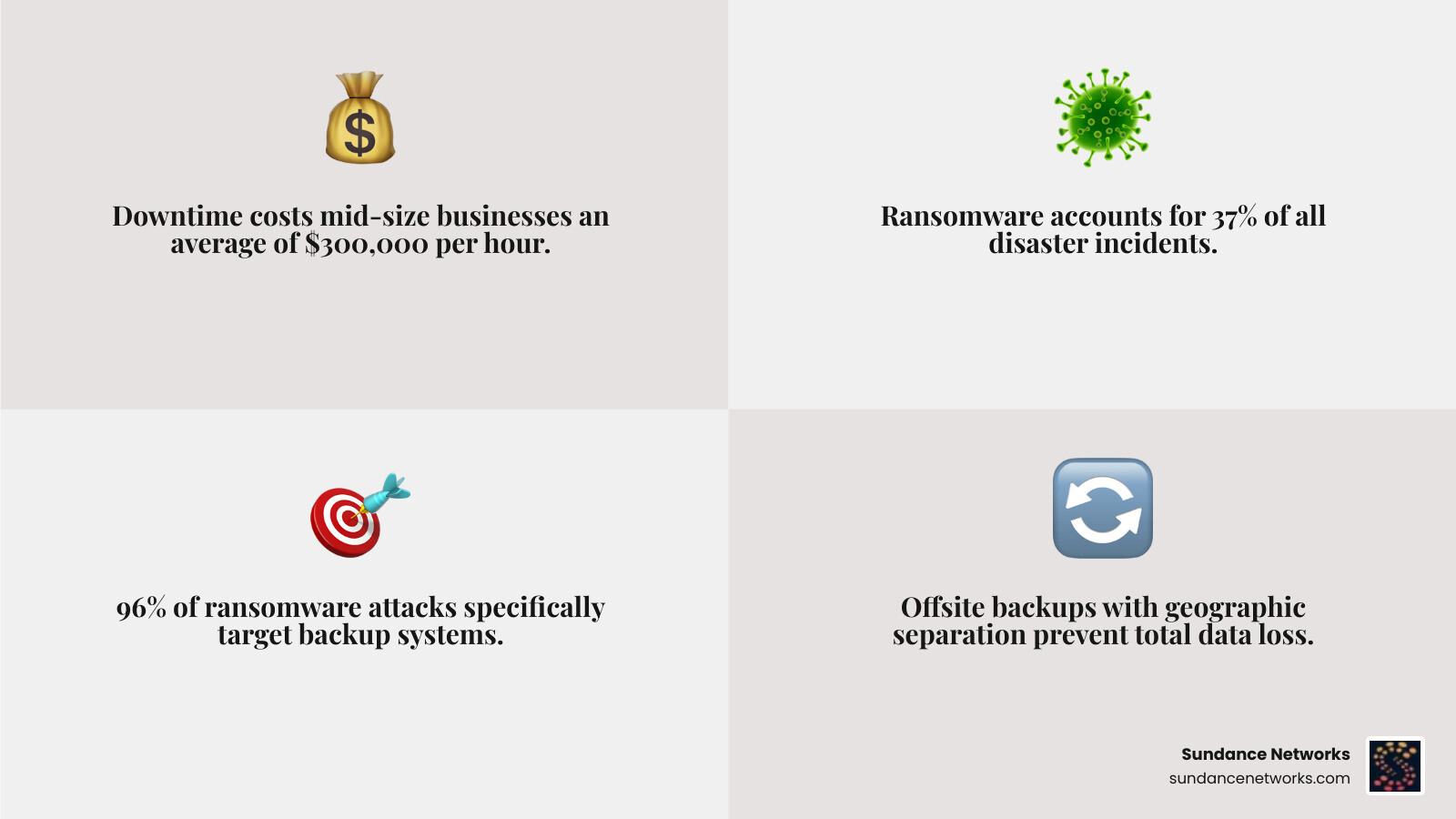
- Downtime costs mid-size businesses an average of $300,000 per hour when core systems go down
- Ransomware accounts for 37% of all disaster incidents — and 96% of those attacks specifically target backup systems
The stakes are real. A well-designed strategy pairs secure offsite storage with a tested recovery plan so your business can bounce back fast — not days later.
What most business leaders don’t realize is that simply having an offsite backup isn’t enough. If that backup is connected to the same network as your production systems, ransomware can encrypt it too. Your offsite copy becomes a perfect replica of the breach.
That’s the false sense of security this guide is here to fix.
I’m Ryan Miller, founder of Sundance Networks and an IT consultant with over 17 years of experience in information systems, and I’ve helped businesses architect offsite data backup storage and disaster recovery strategies that hold up when it matters most. In the sections ahead, we’ll walk through everything you need to build a resilient, tested, and compliant data protection plan.
Understanding Offsite Data Backup Storage and Disaster Recovery
At its core, offsite data backup storage and disaster recovery is about redundancy and resilience. While onsite backups (like a NAS in your server closet) are great for quick file restores, they are vulnerable to the same local disasters that threaten your production servers. If a pipe bursts in your Allentown office or a power surge hits your Reading facility, your onsite backups could be destroyed alongside your primary hardware.
To truly protect your organization, we focus on two critical metrics:
- Recovery Time Objective (RTO): This is the maximum acceptable amount of time your business can be offline. If your RTO is four hours, your DR plan must be capable of restoring operations within that window.
- Recovery Point Objective (RPO): This refers to your data loss tolerance. If you backup every 24 hours, your RPO is one day. For mission-critical data, we often aim for RPOs measured in minutes.
True offsite storage requires geographic separation. We recommend a minimum of 100 miles between your primary site and your backup location to ensure they aren’t on the same power grid or affected by the same regional weather event. For businesses looking for localized expertise, exploring Data Backup and Recovery in Pennsylvania can provide insights into regional infrastructure needs.
The Role of Offsite Data Backup Storage and Disaster Recovery in Ransomware Mitigation
Modern ransomware is “backup-aware.” Research shows that 96% of ransomware attacks now target backup systems first, attempting to delete or encrypt your recovery points before locking your production data. If your backups are reachable via the standard network, they are at risk.
This is where immutability becomes your best friend. Immutable storage uses a “Write Once, Read Many” (WORM) model. Once data is written to an immutable offsite repository, it cannot be changed, encrypted, or deleted by anyone—including an admin or a hacker—for a set period. Using a safeguard digital data with IDrive offsite backup solution or similar immutable cloud buckets ensures that even if your network is compromised, you have a “clean” copy of your data ready for restoration.
Integrating Offsite Data Backup Storage and Disaster Recovery into Business Continuity
It is a common mistake to use the terms “backup” and “disaster recovery” interchangeably. Backup is the act of saving data; disaster recovery is the process of restoring service.
A robust Disaster Recovery & Backup plan includes “failover” capabilities. This means if your physical server in Santa Fe fails, your business can automatically switch to a virtual version of that server running in the cloud. This ensures service availability and business continuity, whereas a simple backup would require you to buy new hardware and spend days reinstalling software before you could even begin moving data back.
The 3-2-1-1-0 Rule: Modernizing Your Backup Strategy
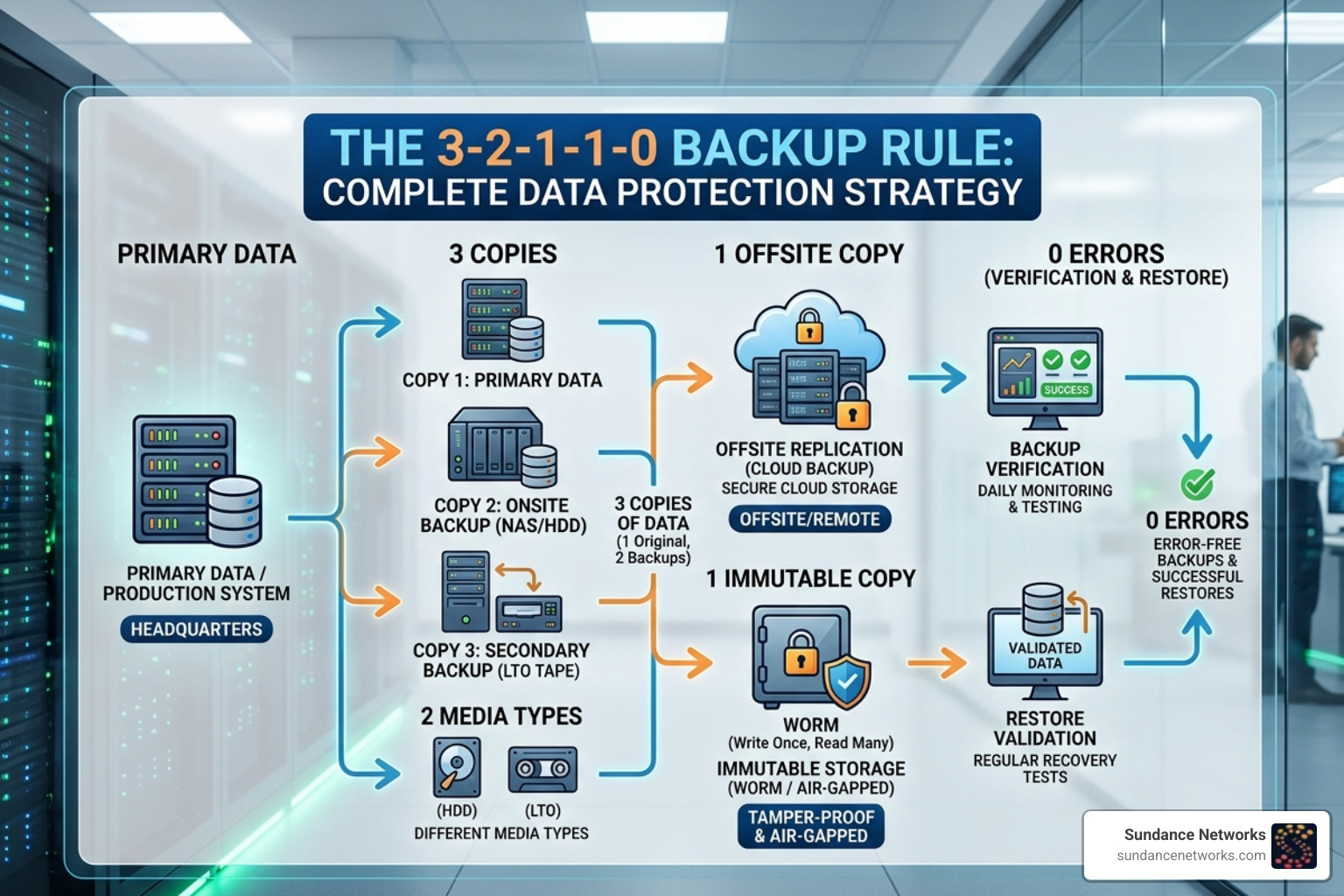
For years, the “3-2-1 rule” was the gold standard: three copies of data, on two different media types, with one copy offsite. However, in an era of sophisticated cybercrime, we’ve updated this to the 3-2-1-1-0 rule:
- 3 copies of data (Primary, Onsite Backup, Offsite Backup).
- 2 different media types (e.g., Disk and Cloud).
- 1 copy offsite.
- 1 copy that is offline or immutable (air-gapped or WORM protected).
- 0 errors after automated backup verification.
This strategy ensures that even if a catastrophic event occurs, your path to recovery is clear. Whether you need Data Recovery & Backup in Washington or other metropolitan areas, the logic remains the same: redundancy is the only way to mitigate the risk of total data loss.
Essential Requirements for True Offsite Separation
“Offsite” doesn’t just mean “in a different room.” To be effective, your offsite strategy needs three types of separation:
- Physical Separation: Different building, different power grid, different flood plain.
- Network Isolation: Your offsite storage should not be permanently “mapped” as a network drive. It should require separate credentials and use secure protocols.
- Administrative Separation: The credentials used to manage your backups should be different from your primary domain admin credentials. This prevents a single compromised account from destroying everything.
For businesses in high-traffic corridors, ensuring Data Recovery & Backup in Morristown follows these isolation principles is vital for surviving targeted attacks.
Comparing Solutions: Cloud, Tape, and Hybrid Offsite Strategies
Choosing the right medium for your offsite data backup storage and disaster recovery depends on your budget and how fast you need to get back to work.
| Feature | Cloud Storage | Offsite Tape | Secondary Data Center |
|---|---|---|---|
| Initial Cost | Low | Medium | Very High |
| Monthly Cost | $0.02 – $0.09/GB | Very Low ($0.001/GB) | High |
| Recovery Speed | 1–4 Hours | 24–72 Hours | 5–30 Minutes |
| Ransomware Protection | High (via Immutability) | Excellent (Air-gapped) | Moderate |
| Scalability | Near Infinite | Manual | Limited |
Cloud solutions like those offered by Backblaze are popular because they eliminate the need for physical hardware and offer “hot” storage that is instantly accessible. Tape vaulting, while seemingly “old school,” remains a favorite for large-scale archival because it provides a physical air-gap that no hacker can cross.
Hybrid Backup: Combining Onsite Speed with Offsite Resilience
We often recommend a hybrid approach. This involves keeping a local “appliance” or server that stores the most recent 30 days of backups for instant recovery (onsite speed), while simultaneously replicating that data to an immutable cloud repository (offsite resilience).
If an employee accidentally deletes a folder in your Brooklyn office, you can pull it from the local cache in seconds. If the entire building is lost, you pull the data from the cloud. This tiered storage model provides the best of both worlds.
Strengthening Your Defenses: Immutability and Encryption Best Practices
Security for your offsite data backup storage and disaster recovery starts with encryption. You must encrypt data at two stages:
- In Transit: Using TLS 1.2 or 1.3 to protect data as it travels over the internet to the offsite facility.
- At Rest: Using AES-256 bit encryption so that even if the storage provider is breached, your files remain unreadable to the attackers.
Platforms like Veeam Data Cloud provide integrated tools to manage these keys securely. Furthermore, we leverage “S3 Object Lock” in WORM mode. This ensures that once your backup hits the cloud, it is locked. Not even a rogue employee with admin access can delete it until the retention period expires.
Access Control and Identity Management
Technology is only half the battle; the other half is identity. We enforce Role-Based Access Control (RBAC), ensuring that only specific, authorized individuals can touch backup configurations.
Multi-factor authentication (MFA) is non-negotiable for all backup accounts. We’ve seen cases where businesses in Manhattan were saved simply because an attacker couldn’t get past the MFA prompt on the backup portal, even after stealing the admin’s password.
Testing and Compliance: Ensuring Your Recovery Plan Actually Works
A disaster recovery plan that hasn’t been tested is just a “disaster wish.” We recommend a multi-tiered testing strategy:
- Checksum Validation: Automated checks to ensure data hasn’t been corrupted over time (bit rot).
- Tabletop Exercises: A quarterly meeting where leadership walks through a “what if” scenario to identify gaps in communication or policy.
- Full Recovery Drills: Once or twice a year, we perform a full restoration of critical systems into an isolated network to verify that the RTO and RPO targets are actually achievable.
Testing is especially critical for businesses in smaller hubs like Bangor, PA, where local IT resources might be leaner and the reliance on automated recovery is higher.
Navigating Regulatory Requirements
Depending on your industry, offsite data backup storage and disaster recovery isn’t just a good idea—it’s the law.
- HIPAA: Requires healthcare providers to have a contingency plan and data backup plan that includes offsite, encrypted storage.
- GDPR: Mandates the ability to restore availability and access to personal data in a timely manner following a physical or technical incident.
- PCI DSS: Requires secure, offsite storage of backup media for any business handling credit card data.
For our clients in Saylorsburg and beyond, we ensure that every backup strategy includes “data sovereignty” considerations—meaning your data stays within the required geographic borders to meet local regulations.
Frequently Asked Questions about Offsite Data Protection
What is the difference between offsite backup and full disaster recovery?
Think of backup as your “spare tire” and disaster recovery as your “roadside assistance plan.” A backup is just a copy of your files (data durability). Disaster recovery is the entire process of getting your car back on the road, including the tools, the mechanic, and the plan to handle traffic (service availability and failover).
How often should we test our offsite disaster recovery workflows?
We recommend quarterly tabletop exercises and at least one full-scale recovery drill annually. If your business undergoes significant infrastructure changes, you should test immediately following those updates.
Can I use the same storage system for local and offsite backups?
Absolutely not. Using the same hardware or vendor for both violates the principle of “no single point of failure.” If that specific storage system has a firmware bug or the vendor suffers an outage, you lose both copies of your data. True resilience requires infrastructure separation.
Conclusion
At Sundance Networks, we believe that smart technology should empower your business, not leave it vulnerable. While we can’t stop every server from crashing or every hacker from trying their luck, we can ensure that when trouble strikes, your business is ready. By combining scalable AI, robust cybersecurity, and a “3-2-1-1-0” approach to offsite data backup storage and disaster recovery, we help you reduce risk and maintain continuity.
Don’t wait for a red warning light in your server room to find out if your backups work. Schedule a consultation for Disaster Recovery & Backup with us today and let’s build a strategy that keeps your company moving forward, no matter what.